
Invite teammates and clients to your workspace and define roles
Collaborate with your team to work on brands with assigned roles. Invite your clients by a link that opens one calendar, with no account and no seat.
What it takes off your hands
- A shared login, because roles were too much work
- A client emailed a PDF of next week’s posts
- The freelancer who can still see everything
- “Who approved this?” with no answer
- A role each, and only the brands they work on
- A link that opens the calendar you chose
- Access that ends the moment you remove them
- Every approval signed and dated
Three roles, and what separates them
Owners and admins hold everything. The line that matters is between an editor, who does the work, and the two things that outlive them: an account other posts depend on, and an automation that keeps running after they log off.
- Admin
- Create and edit content, Comment, Connect a social account, Disconnect or approve an account, Manage automations, Brand settings and who belongs
- Editor
- Create and edit content, Comment, Connect a social account
- Viewer
- Comment (if granted)
A viewer reads everything in the brands they reach and changes none of it, unless an admin grants them commenting — which changes nothing about the content either.
Narrow it as far as you need
A role is the start, not the whole answer. An invite can be scoped to particular brands, then to particular projects inside a brand, and then to particular sections of the app.
- Every brand, or only the ones they work on
- All projects in a brand, or only some
- Only the sections of the app they need
- Whether they can read the team’s Rolly chats
- A pending invite carries the scope with it
- Change any of it later, from the brand’s members page
A client link that shows one thing
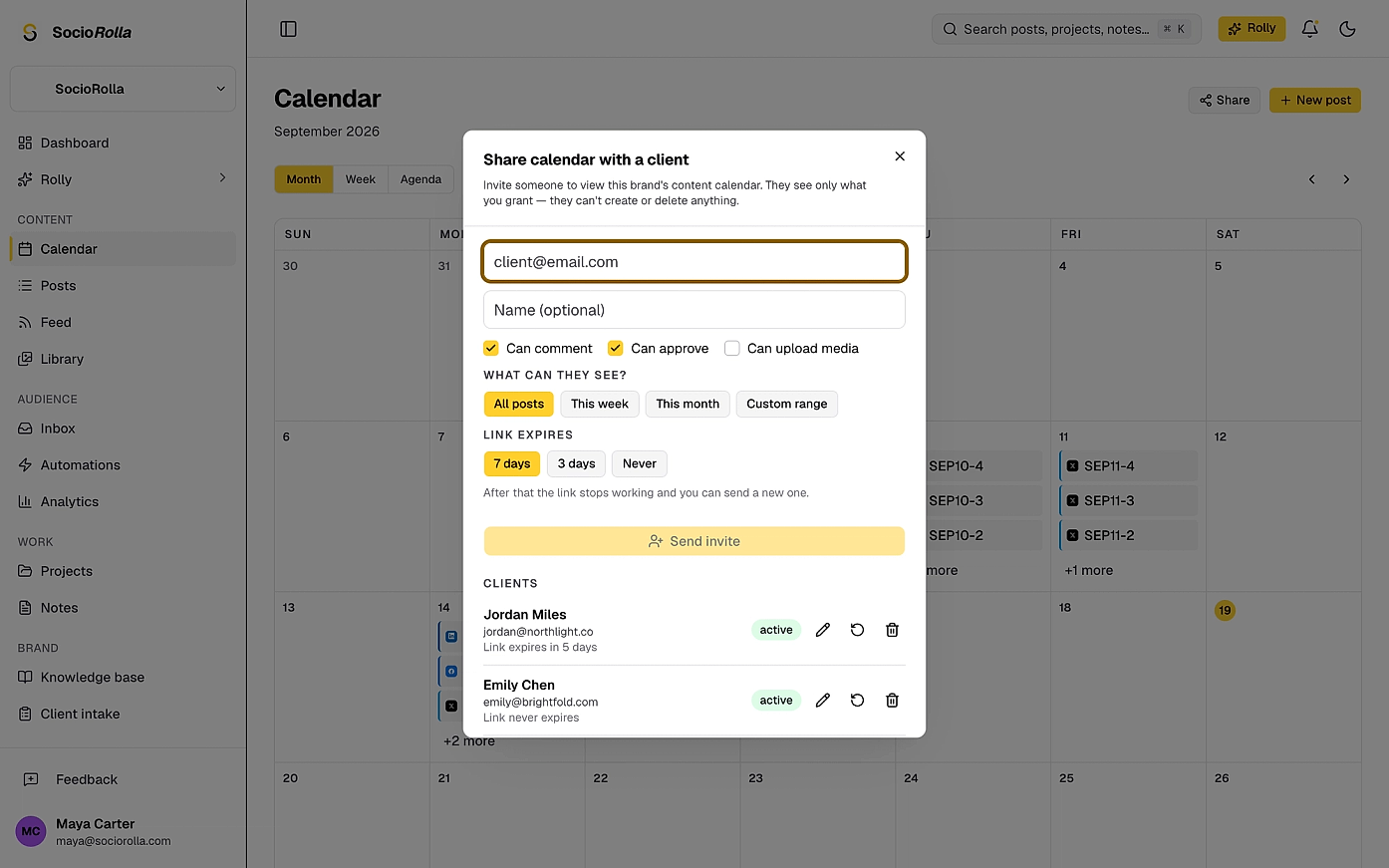
Share a calendar, a single post, a project or a note. Choose what they may do with it, and when the link stops working.
What they see
All posts, this week, this month, or a date range you pick. A calendar share can be a rolling window, so it keeps up without you re-sharing.
What they may do
Comment, approve, upload media. On a project they can be given editing as well.
How long it lasts
Three days, seven days, or never. The choice is remembered, so re-sending repeats it.
What it costs
Nothing. A client is not a member and not a seat; share with six of them if you like.
Approval, with a name on it
A post can be held until someone signs it off. Whoever decides is recorded, and the rule that makes it worth having is enforced on the server, not only in the interface.
Nobody approves their own post
The creator cannot decide on it. The controls are hidden, and the request is refused: “You cannot approve your own post — it needs another reviewer.”
A client can decide from the link
Approve, reject or ask for changes, with a note. Whoever invited them is emailed on approval.
The decision is attributed
Who decided, when, and what they said — whether that was a teammate or a client.
Holding is a choice you make
Per post, or as the brand’s default. A post that needs approval will not publish until it has one.
Access that actually ends
A teammate leaves the team? End their access in one click.
Removal reaches the tab they have open
A person removed from a brand loses it where they are sitting: the brand disappears from their workspace and its live updates stop, without a refresh.
A share link is one revoke away
Revoke it and the link is dead. Only a hash of the token is stored, so re-scoping or re-sending mints a new link and retires the old one.
A link can be given a lifetime
Three days, seven days, or never. The choice is remembered, so re-sending repeats it rather than guessing.
Rolly chats are private by default
A teammate’s chats belong to them. An owner or admin can give someone the team’s chats to read, now and later ones, and the owner reads everything by role. Nothing about that is implicit.
- Roles
- Owner, admin, editor, viewer
- Scope
- Brands, projects, sections
- Clients
- By link, no account, not a seat
Everything in a workspace
- Invite by email, with the role set before they arrive
- Scope an invite to brands, projects and sections
- Change a role, or remove someone, at any time
- Grant a viewer the ability to comment
- Share a calendar, post, project or note with a client
- Choose what a client may do, and for how long
- Approval the author cannot give themselves
- Comments and @-mentions on posts, tasks and notes
- Notifications that reach the people involved
- A pending invite you can see, resend or cancel
Questions about access
A teammate is a member of the workspace with a role, and counts as a seat. A client is invited to one brand by email and sees only what you shared with them. Clients are not seats: sharing a calendar with six clients costs nothing.
Keep exploring
Manage accounts without the overwhelm
Bring one brand or twelve; SocioRolla helps you keep up.